Address
304 North Cardinal St.
Dorchester Center, MA 02124
Work Hours
Monday to Friday: 7AM-7PM
Weekend: 10AM-5PM

Address
304 North Cardinal St.
Dorchester Center, MA 02124
Work Hours
Monday to Friday: 7AM-7PM
Weekend: 10AM-5PM

 Byadmin
In the process of developing the STPMS algorithm, we spent a lot of time in the early stages of frequent loading and testing to verify the algorithm. In order to develop the STPMS algorithm efficiently, we developed the STPMS simulation verification environment, which uses software to perform simulations on computers. Verification, and the input simulation verification data is the vehicle CAN Bus and GNSS real-time data captured during the loading test, which makes the authenticity of the simulation verification almost the same as that during the loading test. This simulation verification environment is used to accelerate the development of the STPMS algorithm.
The simulation verification environment is divided into two categories: one is to execute the STPMS algorithm on the GNSS MCU (Target). The simulation verification software is responsible for sending the captured vehicle and GNSS data to the Target in real time, just like loading and testing, and another The software reads the calculation results and analyzes them. The other is a full simulation verification system that puts the STPMS calculation program into a computer for execution. At the same time, the computer reads the captured vehicle and GNSS data in real time for calculation verification, and analyzes the calculation results at the same time.
Using this simulation verification environment, we achieved the following goals in the development of the STPMS algorithm:

The above figure shows the architecture diagram of a full simulation environment. All operations are executed by software on the computer. The STPMS Algorithm implements the STPMS algorithm in computer software. It should be emphasized here that its program code is exactly the same as the program code in the GNSS MCU. Both are written in C language. In other words, the STPMS is verified in the simulation environment. The Alogrithm program code can be directly moved to the GNSS MCU for compilation and execution, which also greatly simplifies the STPMS software development process and greatly improves development efficiency.
TC is the abbreviation of Transfer Center, which is also the data exchange center of the entire simulation environment, including simulation data read from the file, simulation data sent to STPMS, CAN and GNSS data read by the real device, and human-machine User The data exchanged by the Interface, the execution result analysis data read, and the data can even be sent back to the cloud through the wireless network.
The establishment of this full simulation environment has greatly improved the development efficiency of the STPMS algorithm.
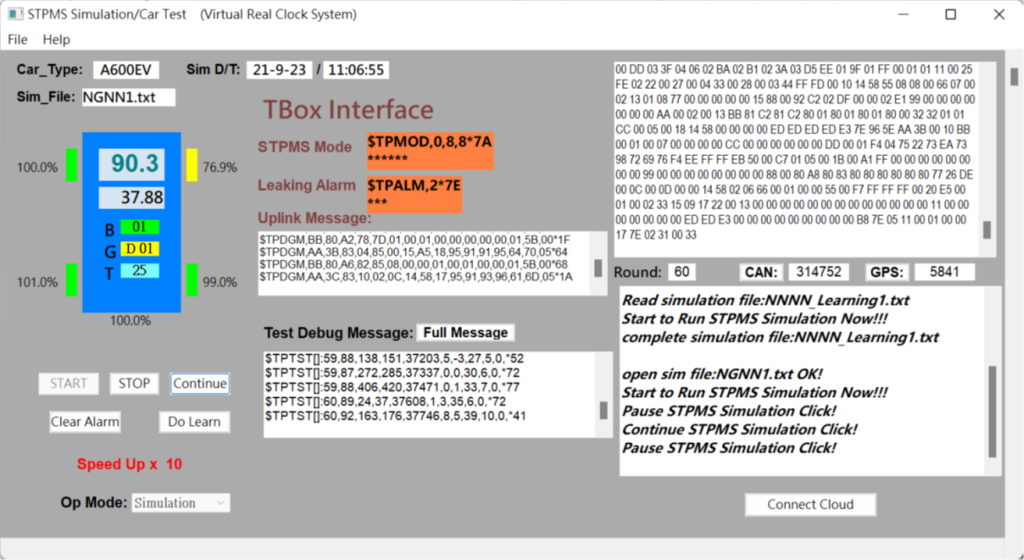
The above is the UI screen of the full simulation system executed on the computer. You can see the status of the four tires next to the car shape. Green means the tire pressure is normal, yellow means under-pressure. The top shows the vehicle speed and mileage, and the bottom shows the brakes ( B), gear position (G) and vehicle temperature (T). In the lower area are the operation buttons, which are START, STOP, Continue, Clear Alarm and Do Learn. At the bottom, you can control the simulation execution speed, up to 100 times, which can greatly shorten the time required for simulation verification.
The middle row is used to display information interfaced with TBox, including STPMS Mode, Leaking Alarm and Uplink Message uploaded to the cloud, as well as test information Test Debug Message.
The upper right side shows the data generated during the STPMS calculation process, and the lower side shows the log of the simulation verification process. The bottom one can be used to connect to the cloud for related tests.
A simulation verification UI can fully complete the calculation verification of STPMS. In addition to being displayed on the UI, the simulation verification results are also stored in files for further analysis.


